Table of Contents
Release Notes - 2026
This page captures product updates release throughout 2026. Each month, you'll find a curated summary of improvements, new capabilities, and fixes designed. Check back monthly to stay up-to-date on what's new!
Table of Contents
June 2026
Metrics Builder
Build custom engineering metrics using natural language or SQL with the new Metrics Builder. Create custom queries against your engineering data, visualize the results as charts or KPI widgets, and save them directly to dashboards. Metrics Builder helps engineering leaders answer organization-specific questions without waiting for predefined reports. Learn more.
AI Playground
Experiment with prompts, compare AI-generated responses, and refine AI workflows before deploying them. AI Playground provides a dedicated environment for testing prompts and evaluating results, making it easier to iterate on AI-powered workflows without affecting production configurations. Learn more.
Claude Code OpenTelemetry
LinearB now supports collecting Claude Code telemetry using OpenTelemetry (OTEL). Organizations can centrally configure managed telemetry collection or deploy organization-wide settings to gain visibility into AI-assisted development activity across Claude Code. Learn more.
Amazon Kiro integration
You can now connect Amazon Kiro to LinearB to measure AI-assisted development activity alongside your other supported AI tools. Once configured, Kiro usage is incorporated into AI Analytics to help you understand AI adoption and engineering impact. Learn more.
Improved user identity management
Managing contributor identities is now more flexible. In addition to automatic and bulk account merging, admins can merge individual users directly from the Users page using ad-hoc and single-user merge workflows. These improvements make it easier to maintain accurate contributor identities and engineering metrics across connected providers. Learn more.
AI Assistant Explore (Open Beta)
Ask questions about your engineering organization using natural language with AI Assistant Explore, now available in Open Beta. Analyze delivery performance, AI adoption, workflow bottlenecks, and engineering trends without manually navigating dashboards. The AI Assistant uses your existing LinearB data to generate summaries, answer questions, and help you identify opportunities to improve engineering performance. Learn more.
Platform improvements
- Recover repositories that have stopped syncing directly from the repository management interface, reducing the need to reconnect integrations. Learn more.
- Mark standalone contributors as bots to exclude automated accounts from delivery metrics such as Pickup Time. Learn more.
- Configure how bot-authored pull requests are attributed within AI Analytics to improve reporting accuracy for automated development workflows. Learn more.
- The default AI interaction confidence threshold has been lowered from 50% to 25% for organizations still using the default setting, improving AI activity detection out of the box. Learn more.
- Delivery metrics documentation has been expanded to include custom deployment stages, helping teams better understand how stage-based delivery metrics and Time to Release are calculated.
May 2026
Amazon Q Developer integration
You can now connect Amazon Q Developer to track AI usage and measure its impact on engineering team productivity. Once connected, Amazon Q activity is correlated against pull-request and commit data alongside the other AI tools LinearB tracks. Read the docs.
Other improvements
- Connecting Azure Devops to LinearB no longer causes test work items to be surfaced alongside development work items by default to reduce noise and integration challenges See the Azure Boards integration guide.
- LinearB now supports GitHub Copilot Enterprise for all GitHub Enterprise customers, including organizations on custom enterprise subdomains. See the configuration guide.
- You can now manage the dates that individuals joined teams within the edit team UI. This allows you to control when a user starts contributing to team metrics, improving the accuracy of historical data attribution.
- Jira configuration now supports OAuth 2.0 server flows, providing improved security for Jira Data Center deployments. See the configuration guide.
- The messages for LinearB AI code reviews have been improved and the reviews no longer trigger when syncing the main branch into the PR.
- The gitStream automation to flag PRs with missing Jira labels is now available natively in the LinearB platform for LinearB Essentials accounts. Access it by going to Company settings > AI Tools
April 2026
Claude Analytics API integration
You can now connect LinearB to your Claude Code Enterprise Analytics API to gain visibility into AI-assisted development activity. This integration enables you to track and analyze how your team uses Claude across your codebase. Learn more.
Other improvements
- Improved reliability of metric collection for on-premise sensor deployments across multi-project manager configurations.
March 2026
Configurable AI classification thresholds
You can now adjust the threshold that determines when a commit or pull request is classified as AI-assisted. Tailor the default 50% threshold to improve the accuracy of your data across AI Insights and AI Analytics to match your team's development practices. Learn more.
Multi-domain SSO support
For orgs using multiple email domains, you can now add up to 15 domains to a single SSO configuration, allowing every user to authenticate with their approved company domain. Learn more.
MCP Server: Now generally available for admins with OAuth
Generally available to admins, connect to the MCP Server using OAuth authentication for a faster, more secure setup that replaces the previous token-based flow. Additionally, the MCP Server now surfaces AI Analytics data. Query adoption, usage, and delivery impact metrics.
Combined with performance optimizations, you get faster responses and richer context when using the MCP to explore how your engineering organization operates. Learn more.
Copilot and Cursor Metrics dashboards retiring April 2
The standalone Copilot and Cursor Metrics dashboards, along with the AI Tool Usage views on the AI Insights dashboard, will be deprecated on April 2. These dashboards relied on third-party API data that could include contributors from outside your LinearB team environment, creating confusion and mismatched reporting. They also limit org-level granularity with no drill-down by team, user, or repo, making reporting less impactful.
Going forward, we recommend using the dashboards in AI Analytics for more accurate, filterable AI data to measure adoption and impact.
February 2026
AI Analytics: Measure AI impact on delivery and quality
You now have a comprehensive way to measure how AI adoption shapes engineering outcomes. AI Analytics connects AI activity directly to commits and PRs so you can compare AI-assisted work against human work across your entire codebase. Understand whether velocity gains come at the cost of quality.
Dig into trends across workflows, repos, teams, and users, and dive deeper into reports that cover delivery, throughput, and quality metrics. Slice data by workflows, tools, team, user, or repo to compare AI-assisted vs. human work side-by-side. Learn more.
Supported API integration for Claude Code
Claude Code joins GitHub Copilot and Cursor as a natively supported AI tool integration. Get deep telemetry with AI activity mapped directly to commits and PRs so you can measure adoption, usage, and delivery impact across your full AI tool stack from a single platform. Admins can integrate this under Settings > Company Settings > AI Tools > Claude Code. Learn more.
Updated navigation: New productivity tab
You’ll notice a refreshed navigation layout designed to make it easier to find what you need. A new “Productivity” tab now houses AI Insights and Surveys, keeping adoption and developer sentiment together. For AI-specific impact metrics, head over to Metrics > AI Analytics.
Smarter user management with auto-merge and bulk merge
Keeping contributor records clean just got easier. New auto-merge capabilities now run in the background, automatically matching and consolidating user accounts, including AI tool identities, by email or provider ID. No manual effort required. Learn more.
For remaining duplicates, a new bulk merge interface surfaces suggested matches ranked by confidence level so you can review and apply merges in a single action. Cleaner records mean more accurate metrics across the platform. Learn more.
GitHub team sync at scale
If you manage team structures in GitHub, you can now sync them directly into LinearB with automatic daily refreshes to keep everything current. Partial sync support lets you choose specific teams to include or exclude so your setup reflects how your organization operates. And improved handling for nested teams and org-level changes means fewer manual adjustments as your teams evolve. Learn more.
January 2026
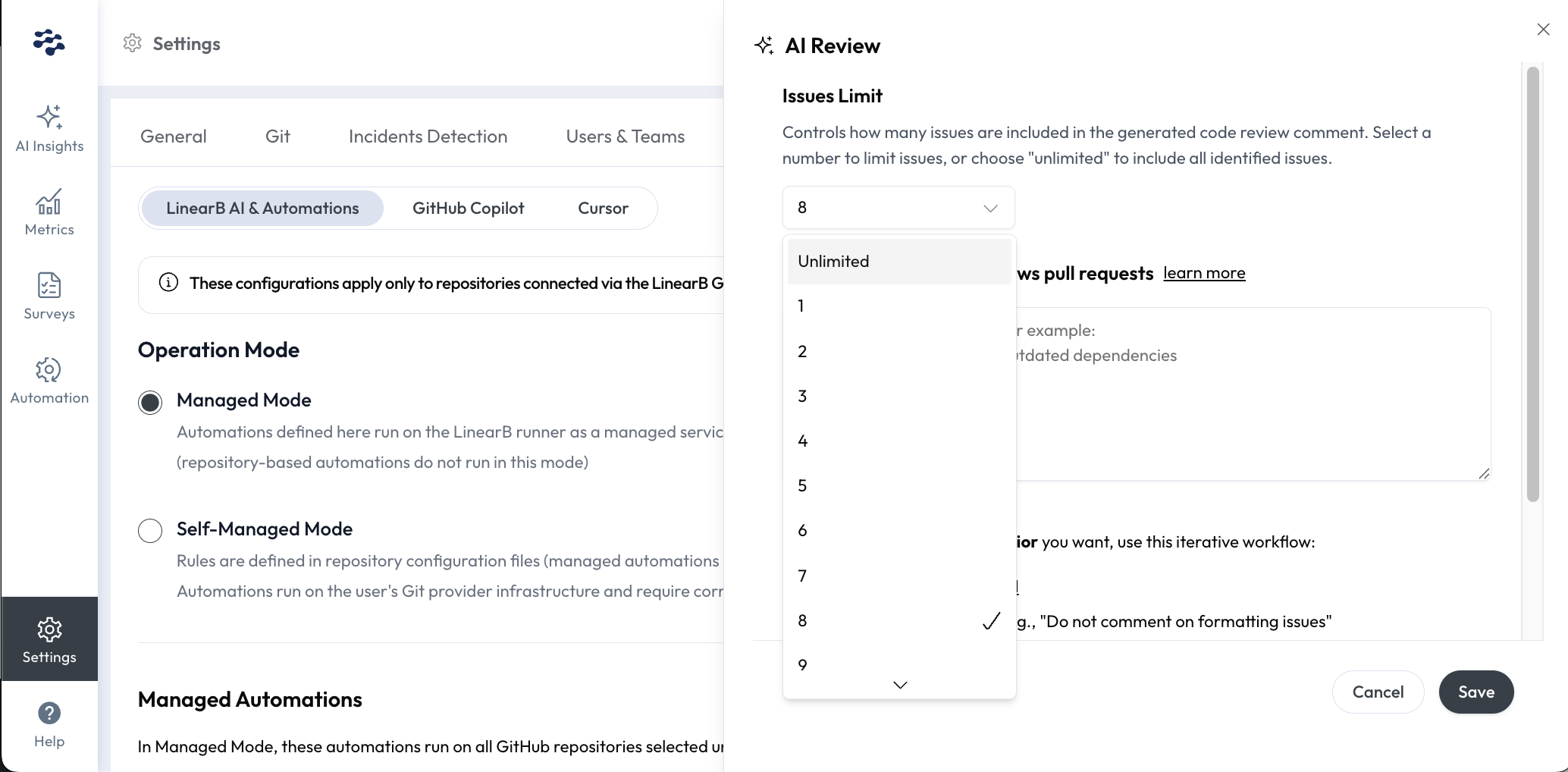
Control how many issues appear in AI Code Review comments
A new issue_limit setting lets you define and limit the number of issues included in PR comments generated by the LinearB AI Code Review. Read the docs.
User admins in Essentials using the managed mode can configure this directly in your Settings UI under AI Tools > Managed Automations > AI Review > Edit > Issues Limit.
New user and team management experience
We've made it easier for admins to manage users, teams, and billing by streamlining workflows into a single tab in Settings > Users & Teams. In this tab, user identities can be merged across Git and project management tools, deleted and hidden, and filtered by billable vs. non-billable status. Read the docs on what's changed.
OPA v4.1.5 improves GitLab contributor accuracy
This upgrade provides cleaner, more reliable contributor data from GitLab, making it easier to identify and merge accounts with autogenerated names such as "Anonymous-123."
How did we do?
Lower Default AI Interaction Confidence Threshold to 25%
