Table of Contents
How and When LinearB Counts Commits
LinearB counts commits by tracking repository activity, branch configurations, and optional integrations like Jira. The system ensures accuracy through fallback mechanisms for squash merges, configur…

Table of Contents
LinearB counts commits by tracking repository activity, branch configurations, and optional integrations like Jira. The system ensures accuracy through fallback mechanisms for squash merges, configurable exclusions for branches, and tailored workflows for draft PRs. These methods provide a comprehensive approach to commit tracking while accommodating diverse development practices.
Here is an overview of how LinearB processes and attributes commits:
Commit Counting Process
- Detection of Commits
- LinearB scans repositories configured under Company Settings > Git.
- Commits are tracked based on the repository’s activity and branches monitored by LinearB.
- Commit Attribution
- Commits are attributed to branches and developers based on the repository history.
- Squash merges, draft PRs, and excluded branches are handled through specific rules to ensure accuracy. For more information, refer to the section "How LinearB Handles Squash Merges".
- Earliest Commit Detection
- LinearB records the earliest commit in a branch for accurate coding time calculation.
- For squash merges, LinearB relies on this earliest commit if it precedes the reported first commit.
- Jira Integration (Optional)
- When Jira-based coding time is enabled, commits are tracked from the moment a linked Jira issue transitions to "In Progress", offering a more task-specific approach.
For more information, see the section "Jira-Based Coding Time".
If you’re not seeing a recent commit in your LinearB dashboard, the Troubleshooting section below can help you identify and resolve the issue. - When Jira-based coding time is enabled, commits are tracked from the moment a linked Jira issue transitions to "In Progress", offering a more task-specific approach.

When Does LinearB Count Commits?
- Branch Activity
- Commits are counted as soon as they are pushed to a branch.
- Local commits are not detected until pushed to the repository.
- Squash Merges
- LinearB counts all commit activity included in a squash merge by referencing the earliest detected commit in the branch.
- Draft PRs
- While in draft status, commits are attributed to coding time but excluded from cycle time. For more information, refer to the section "Draft Pull Requests".
- Excluded Branches
- Commits to branches excluded in the global or repository-specific settings are not counted in dashboards or reports.

Key Scenarios
- Multiple Commits in a Branch
All sequential commits in a branch are included, provided the branch is not excluded. - Squash Commits
Commits are aggregated, and the earliest detected commit timestamp is used for calculations. - Draft PRs
Commits are counted but remain part of the coding stage and are excluded from cycle time metrics. - Unconnected Jira Issues
If no Jira issue is linked to a branch, LinearB defaults to commit-based timestamps for tracking. - Weekend Exclusions
If weekend exclusions are configured, commits made during weekends may not contribute to certain metrics.
Key Benefits of LinearB’s Approach
- Accurate Metrics: By detecting the earliest commit, LinearB ensures that coding time reflects the actual development effort, even for branches utilizing squash merges.
- Flexibility: Teams can choose between commit-based and Jira-based coding time to suit their workflows.
- Streamlined Reporting: Squash merges no longer distort coding time metrics, enabling more meaningful insights into development timelines.
By addressing the challenges posed by squash merges, LinearB ensures accurate and reliable tracking of coding time, empowering teams to better understand and optimize their development processes.

How LinearB Handles Squash Merges
What is Git Squash?
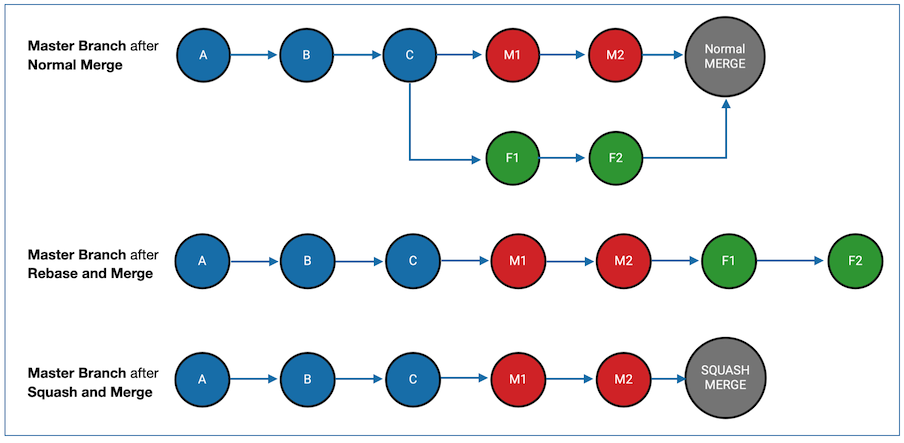
Git squash is a feature that consolidates multiple sequential commits into a single base commit. This process simplifies the commit history by merging all changes from the selected commits into one, creating a cleaner and more streamlined repository history.
The result of squashing is a single base commit containing the cumulative changes from the selected commits.

Impact of Squash Merges on LinearB Metrics
By default, LinearB calculates coding time for a branch using the timestamp of the first commit in the branch. However, when squash merges are used:
- All commit activity in the branch is combined into a single commit with a single timestamp.
- This can make branches with squash commits appear to have a coding time of 0, as LinearB might consider only the first listed commit in the branch’s history.
To ensure accurate metrics, LinearB provides two strategies to address this issue.
How LinearB Addresses Squash Merges
- Earliest Commit Detection
LinearB monitors branches and records the earliest commit associated with each branch.- If a squash merge is detected (indicated by the earliest commit occurring before the reported first commit), LinearB uses the timestamp of the earliest detected commit for coding time calculations.
- This ensures that all coding time is accurately captured, even when commits are consolidated into a squash merge.
- The earliest commit must be pushed to a branch to be detected by LinearB.
- Local commits that have not been pushed will not be included in the coding time calculation.
- Jira-Based Coding Time
Teams using Jira for project management can leverage LinearB's Jira-based coding time feature.- With this feature, coding time begins when the Jira issue linked to a branch is transitioned to "In Progress", rather than relying solely on commit timestamps.
- This method provides a more contextual approach, aligning coding time with task lifecycles.

Jira-Based Coding Time
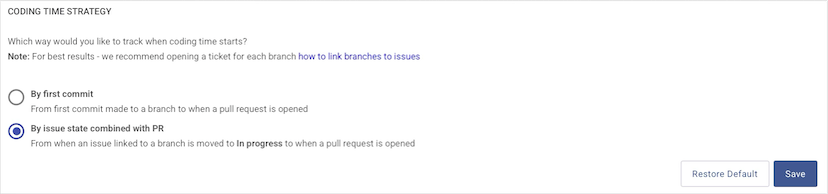
LinearB offers a Jira-based Coding Time feature to enhance tracking of development workflows. By default, LinearB calculates coding time as the duration from the first commit on a branch to the moment a pull request (PR) is submitted. With Jira-based Coding Time enabled, coding time is measured based on the lifecycle of a Jira issue linked to a Git branch, starting from when the issue is moved to "In Progress" until a PR is opened.
This setting applies at the organizational level, impacting all teams.
Prerequisites
To use Jira-based Coding Time effectively, ensure the following:
- Git Branch and Jira Issue Matching: All Git branches must be linked to Jira issues. For details on naming conventions to facilitate matching, refer to the Jira Naming Conventions Guide.

How to Enable Jira-Based Coding Time
- Navigate to Company Settings > Advanced.
- Scroll to the Coding Time Strategy section at the bottom of the page.
- Select By Issue state combined with PR.
- Click Save to apply the changes.

Known Behaviors
- Unmatched Branches:
- If a branch is not linked to a Jira issue, LinearB defaults to using the timestamp of the first commit as the start of coding time.
- Multiple Jira Tickets on the Same Branch:
- LinearB uses the oldest Jira ticket connected to the branch as the starting point for coding time.
- Branches Locked After Merge:
- Once a branch is merged, LinearB locks it from updates. If a Jira issue is linked to the branch after merging, the coding time will default to the first commit timestamp.
- Jira Status Changes After PR Submission:
- If a Jira issue is moved to "In Progress" after a PR is submitted, LinearB falls back to using the first commit timestamp as the start of coding time.

Recommendations for Best Results
- Create Jira Tickets for Every Branch:
- Ensure that every branch created has a corresponding Jira ticket to avoid unmatched branches.
- Monitor Unmatched Branches:
- Use LinearB’s unmatched branch alerts to quickly identify and address branches that are not linked to Jira issues.

Draft Pull Requests
Draft pull requests (Draft PRs) are an integral part of modern development workflows, allowing teams to initiate collaboration and gather feedback early in the coding process. Unlike regular PRs, Draft PRs signal that the work is still in progress and not ready for final review or merging. They are commonly used to leverage CI systems connected to Git providers or to foster collaboration among team members.
Current Support for Draft PRs
- Supported Platforms: Draft PRs are supported in GitHub and GitLab.
- Unsupported Platforms:
- Azure Repos: Does not currently report the date and time when a PR transitions from draft to live via their API.
- Bitbucket: Does not natively support the concept of draft PRs.

How LinearB Handles Draft PRs
- Exclusion from Cycle Time Calculations:
- Time spent in the draft state is attributed to coding time and excluded from cycle time metrics.
- Notifications Disabled:
- LinearB suppresses notifications for draft PRs, such as "Review request hanging" and "Review too long", as they are not ready for formal review.
- Distinct Identification:
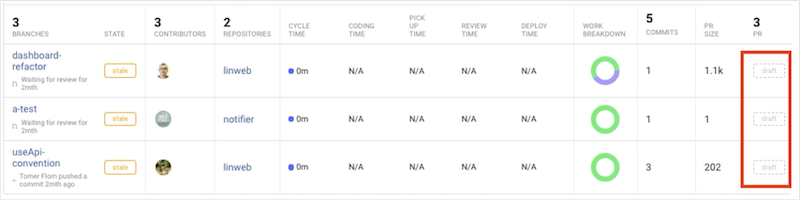
- Draft PRs are marked with a “Draft” badge on the Branches and PRs pages, making them easily distinguishable.

Custom Draft PR Naming Conventions
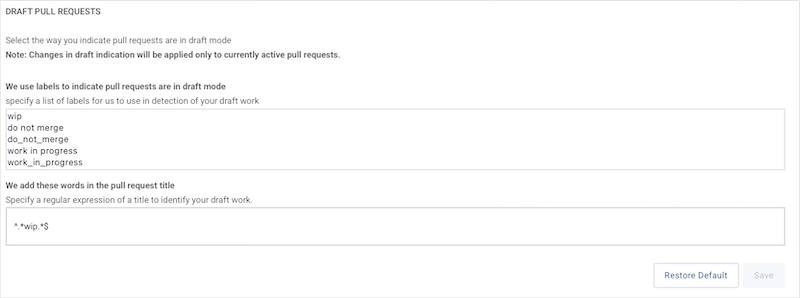
LinearB automatically detects and handles draft PRs on supported platforms. However, you can customize naming conventions to designate specific PRs as drafts:
- Navigate to Company Settings > Advanced.
- Scroll down to the Draft Pull Requests section.
- Enter regular expressions that match your organization’s draft PR naming patterns.
- Save your changes to enable the detection of custom draft PRs.

Benefits of Using Draft PRs with LinearB
- Encourages Collaboration: Draft PRs help teams engage in early discussions and improve code quality before formal reviews.
- Streamlined Metrics: By excluding draft PRs from cycle time, LinearB ensures that metrics reflect only finalized development stages.
- Customization Flexibility: Teams can tailor draft PR recognition to their specific workflows using naming conventions.

Troubleshooting: Missing Commits From Your Dashboard
If you’re not seeing a recent commit in your LinearB dashboard, the following steps can help you identify and resolve the issue. For additional support, reach out to support@linearb.io.
1. Repositories Not Being Scanned by LinearB
LinearB only tracks commits in repositories that are actively scanned. Follow these steps to verify and update your repository configuration:
- Navigate to Company Settings > Git.
- Click the + icon next to your Git integration to view the repositories being scanned.
- If the repository is missing, select Add Repositories.
- Follow the prompts to include the missing repository.
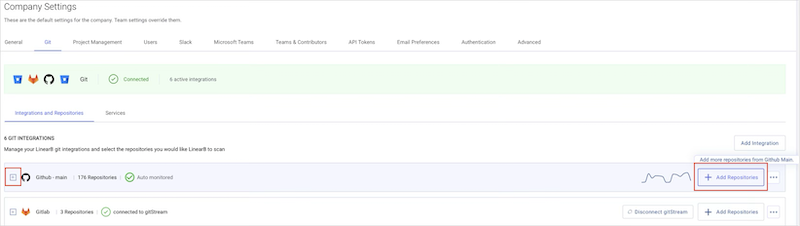
For more information, refer to the article Add Additional Repositories to LinearB.

2. Branches Excluded from LinearB
LinearB may exclude certain branches from reporting due to default or custom exclusion rules. If the repository is being scanned but commits are still missing, check the branch exclusion settings.
Editing Exclusions Globally
To review and modify global branch exclusions:
- Go to Company Settings > Advanced.
- Scroll down to the Exclude Branches section.
- Add or remove branches using regular expressions to define exclusion rules.
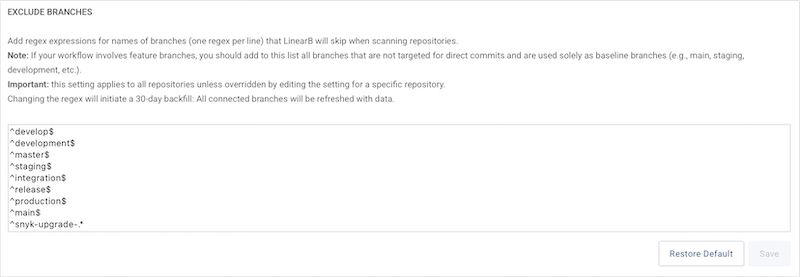
Commits to branches listed here will not appear in dashboards or reports.

Editing Exclusions by Repository
For repository-specific exclusion settings:
- Navigate to Company Settings > Git.
- Locate the repository in question and click the gear icon.
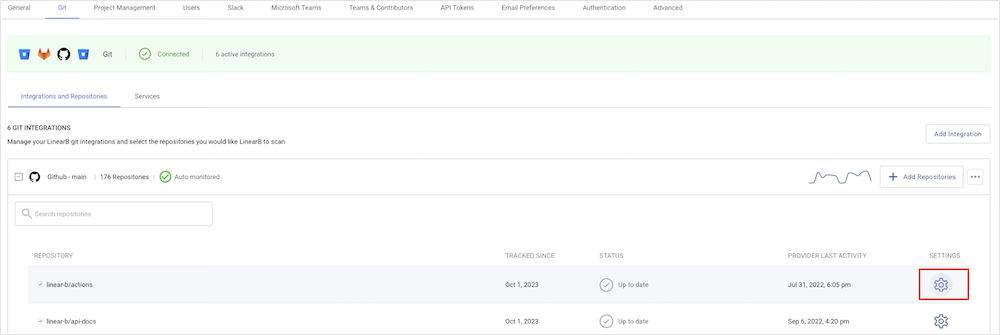
- Adjust the Exclude Branches section for that specific repository.
Changes made here override global exclusions for the selected repository.

Troubleshooting Summary
By ensuring repositories are being scanned and branch exclusions are correctly configured, you can resolve most issues with missing commits in your dashboard.
If problems persist, don’t hesitate to contact us at support@linearb.io for further assistance.
How did we do?
Handling Squash Merges in LinearB
Indirect Code Contribution 👻
