Understanding Iteration Alerts
Stay informed about development delays with Iteration alerts triggered by long-running reviews and pull requests, helping teams identify and resolve workflow bottlenecks early.

Iteration Alerts notify teams about potential delays in the development workflow by highlighting pull requests and review requests that have been idle for too long. These alerts help teams surface bottlenecks early and keep work moving during an iteration.

Summary
- Iteration alerts focus on review-related delays in Git workflows.
- Alerts are triggered for unpicked review requests and stalled pull requests.
- They help teams identify bottlenecks during active iterations.
- Each alert links directly to the affected pull request.
What triggers an iteration alert
Iteration alerts are generated when LinearB detects that work is blocked or slowing down in the pull request review process.
Alerts are triggered when:
- A review request has not been picked up for an extended period.
- A pull request has remained in review for too long without progress.
Viewing and using alerts
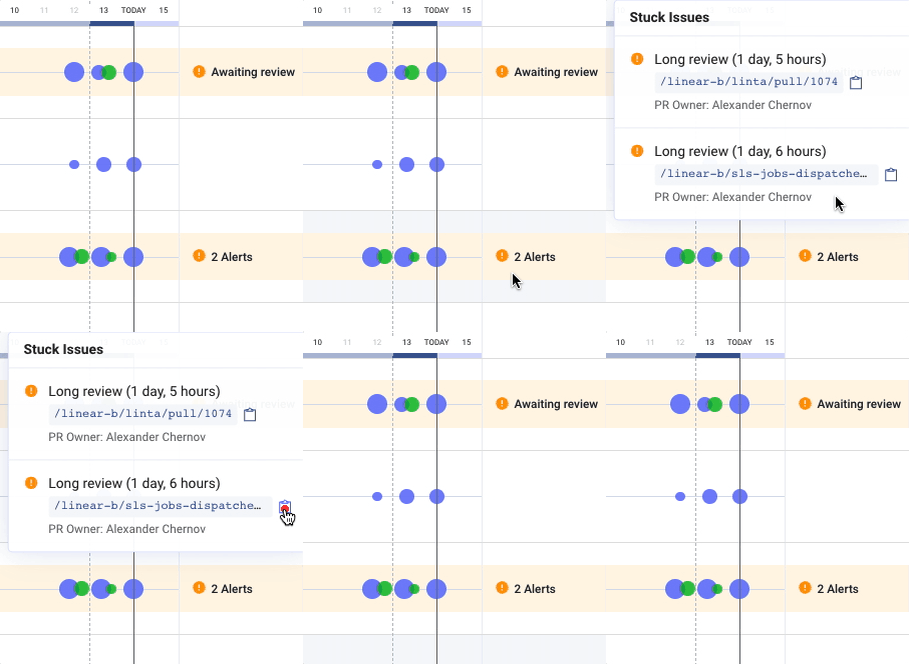
Alerts appear directly in the Iterations view, allowing teams to quickly identify stalled work without leaving the context of the sprint.
- Hover over an alert to reveal additional context.
- Copy a direct link to the pull request for quick access.
Why iteration alerts matter
Review delays are a common source of hidden inefficiency. By surfacing stalled reviews, iteration alerts help teams:
- Reduce cycle time caused by waiting states
- Balance review workload across the team
- Prevent work from silently blocking iteration progress
How did we do?
Teams: Iterations