Table of Contents
Development Experience (DevEx) Metrics in LinearB
Optimize developer workflows with LinearB’s Development Experience (DevEx) Metrics, tracking pickup, merge, and deploy wait times to reduce bottlenecks and improve efficiency.

Table of Contents
The Development Experience (DevEx) Metrics in LinearB provide visibility into a developer’s workflow after a pull request (PR) is opened. These metrics help teams identify process bottlenecks, reduce idle time, and improve overall developer productivity.

Summary
- Open DevEx metrics from Teams → Coaching.
- Select a team, timeframe, and team member to scope the results.
- Use Pickup, Merge, and Deploy wait times to identify bottlenecks and coaching opportunities.
Viewing the Development Experience metrics
- In the LinearB side menu, click Teams → Coaching.
- Select a team and timeframe from the top of the page.
- Select the team member whose metrics you want to view.
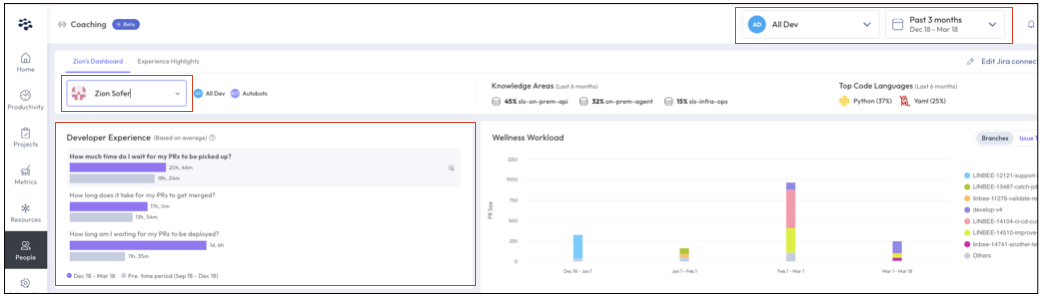
- Timeframe selection: DevEx metrics reflect the selected timeframe at the top of the page and compare it to the previous period (shown in grey).
- Metrics calculation method: Values are based on KPIs from the Metrics Dashboard and follow the calculation method set in Company Settings.
Key DevEx metrics
- Pickup Wait Time — Measures the time from when a PR is opened to the first reviewer comment.
- Merge Wait Time — Tracks the time from PR approval to when the PR is merged into the main branch.
- Deploy Wait Time — Measures the time from PR merge to deployment in production.
High or increasing values in any of these areas indicate bottlenecks and potential opportunities to improve developer workflows.
Identifying and resolving DevEx bottlenecks
High Pickup Wait Time
What it means
- Developers experience long idle times before a PR is reviewed.
- Increased context switching disrupts focus and reduces efficiency.
- Delivery timelines and code quality may suffer due to delayed feedback.
How to improve
- Keep PRs small to make them easier to review.
- Set team goals for both pickup time and PR size.
- Assign an additional reviewer to keep reviews moving.
-
Use SEI + Automation to:
- Add estimated review time labels automatically.
- Auto-review and approve safe changes to accelerate feedback loops.
High Merge Wait Time
What it means
- Prolonged idle time and frequent context switching can lead to delayed merges.
- Developers lose momentum as PRs remain unmerged for extended periods.
How to improve
- Monitor PR progress with real-time alerts in collaboration tools (Slack, Microsoft Teams).
- Use workflow automation to ensure approved PRs are merged promptly.
- Keep PRs top of mind by including them in standups and daily team discussions.
High Deploy Wait Time
What it means
- Something is preventing code from reaching production efficiently.
- Common blockers include lack of visibility, inefficient CI/CD pipelines, or misaligned deployment processes.
How to improve
- Use real-time alerts to keep deployment tasks on track.
-
Review and adjust deployment policies, including:
- Acceptance testing design — Ensure testing does not delay deployment.
- CI/CD configurations — Optimize automation for faster delivery.
- If delays persist at an organizational level, review DevOps policies to streamline deployments.
Why use DevEx metrics?
- Reduce idle time and optimize developer workflows.
- Minimize context switching to improve focus and efficiency.
- Accelerate PR reviews, merges, and deployments for faster code delivery.
By leveraging Development Experience (DevEx) Metrics in LinearB, teams can identify workflow inefficiencies, improve engineering productivity, and drive continuous process improvements.
Related Resources
How did we do?
Developer Coaching
Filtering Team Insights With Git Scope
