Share a Dashboard
Share a Personal dashboard with your organization by setting its visibility to Shared. Others can view it but not edit it.
Agentic Studio is currently in beta. Reach out to your CSM to request access or share feedback.
Make one of your Personal dashboards visible to everyone in your organization by setting its visibility to Shared.
New to Agentic Studio? Start with Agentic Studio Overview.
Share a dashboard
- Open a Personal dashboard you own.
- Select Edit dashboard.
- Under Visibility, select Shared.
- Click Save.
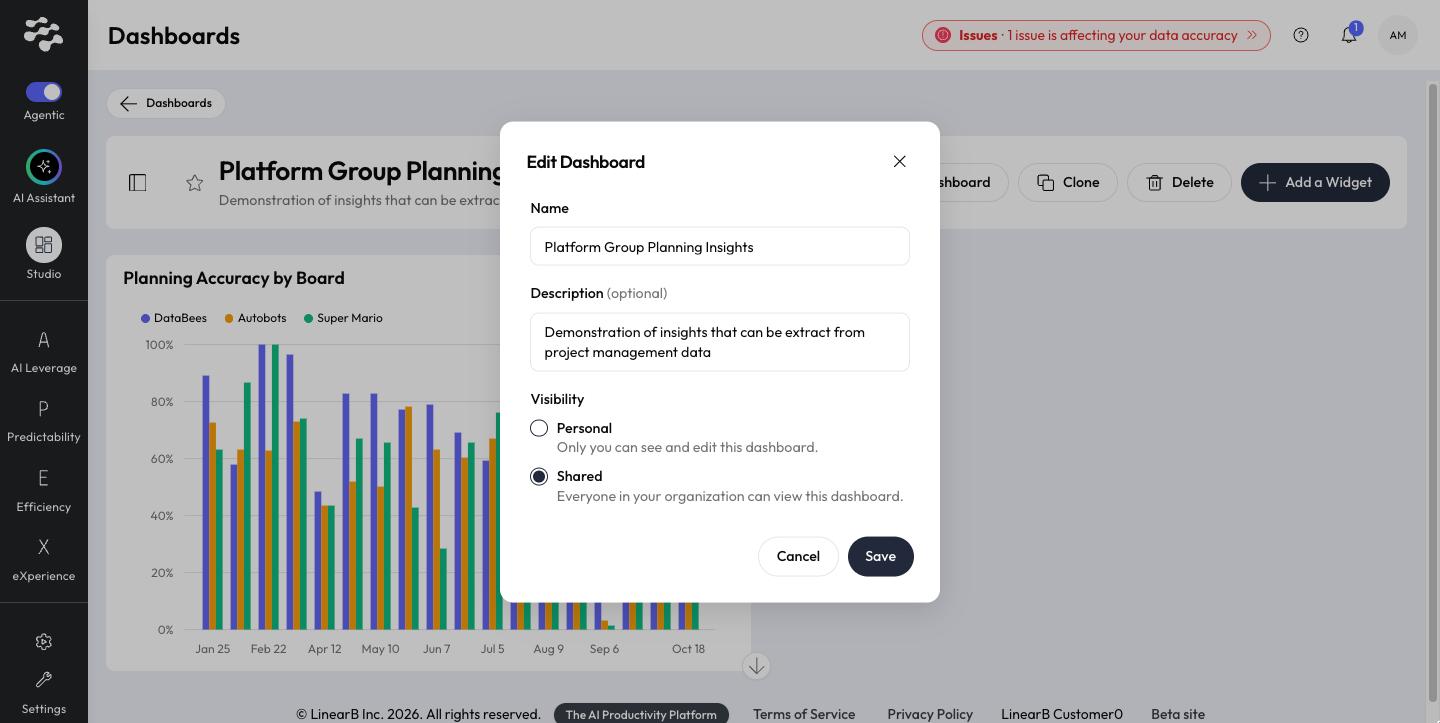
To stop sharing, set Visibility back to Personal. You can also open Edit from the dashboard's card menu (⋮) in the library.
What happens when you share
- Everyone in your organization can view the dashboard. Others cannot edit it.
- The dashboard shows a Shared badge.
- Others find it in the library under Shared with me.
- You still find it under Personal; turn on Show only shared to list the dashboards you shared.
- To change a shared dashboard, others can Clone it.
Related articles
Need help with Agentic Studio? Contact support@linearb.io or visit the LinearB Help Center.
How did we do?
