Configuring AI Classification Thresholds
Use Classification Thresholds to control how LinearB classifies commits and pull requests as AI-assisted. These settings affect how AI activity is labeled in the product and how AI Analytics metrics…

Use Classification Thresholds to control how LinearB classifies commits and pull requests as AI-assisted. These settings affect how AI activity is labeled in the product and how AI Analytics metrics are interpreted across dashboards and reports.
Changing these thresholds can affect AI-assisted commit and pull request classification, which may change how AI adoption and usage metrics appear in LinearB.
Overview
LinearB evaluates AI activity at the commit level first, and then uses that result when classifying pull requests.
The Classification Thresholds settings let you define:
- Commit AI-Assistance Threshold – when a commit is marked as AI-assisted
- PR AI-Assistance Threshold – when a pull request is marked as AI-assisted based on its commits
Where to configure classification thresholds
- In LinearB, go to Settings.
- Open the AI Tools tab.
- Select Classification Thresholds.
- Adjust the threshold values as needed.
The Classification Thresholds settings appear as shown below:
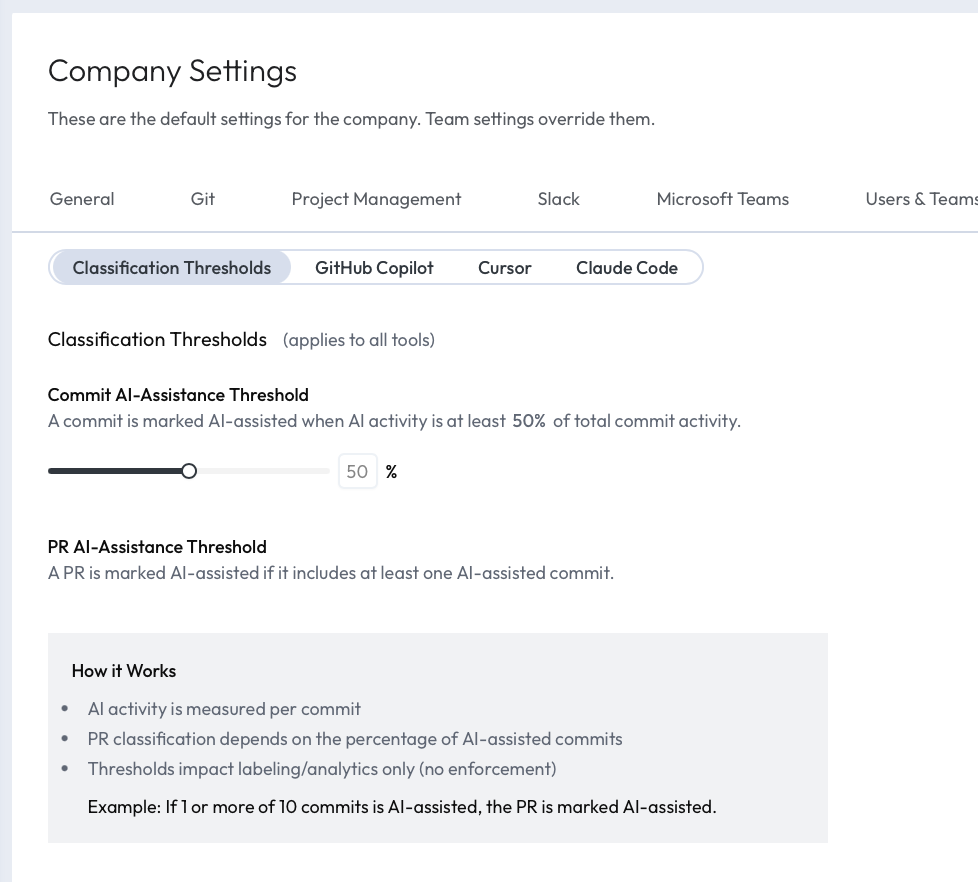
Commit AI-Assistance Threshold
The Commit AI-Assistance Threshold determines when commits are classified as AI-assisted based on AI tool usage. The default is 25%.
For each developer and each day (UTC), LinearB calculates the ratio of AI-accepted lines to the total lines that developer committed that day. If the ratio meets or exceeds the threshold, all commits by that developer on that day are classified as AI-assisted. If it is below the threshold, those commits are classified as not AI-assisted, unless a commit contains explicit AI-related Git metadata such as a Co-authored-by trailer.
For example, if the threshold is set to 25% and a developer accepted 100 AI-suggested lines and committed 300 lines on the same day (33%), all of that developer’s commits for that day are classified as AI-assisted.
PR AI-Assistance Threshold
The PR AI-Assistance Threshold determines when a pull request is classified as AI-assisted based on the commits included in that PR.
LinearB first classifies each commit individually. It then evaluates the pull request using the configured PR threshold.
Example:
- If a pull request contains 10 commits
- and 1 or more of those commits are classified as AI-assisted
- then the pull request is marked AI-assisted when the PR threshold is set accordingly
How classification works
- AI tool usage is measured per developer, per day, and the result is applied to all of that developer’s commits on that day. Commits with explicit AI-related Git metadata are always classified as AI-assisted.
- Commit classification is based on the Commit AI-Assistance Threshold.
- PR classification is based on the share of AI-assisted commits in the PR.
- Thresholds affect how data is labeled in AI Analytics and related reporting.
Example
Suppose the following thresholds are configured:
- Commit AI-Assistance Threshold: 25%
- PR AI-Assistance Threshold: 10%
If a pull request contains 10 commits and 1 of those commits is classified as AI-assisted, the pull request is marked as AI-assisted because 1 out of 10 commits = 10%.
How this affects AI Analytics
Classification thresholds directly affect how LinearB reports AI-assisted work in:
- AI adoption metrics
- AI usage metrics
- AI-assisted commit counts
- AI-assisted pull request counts
If you change the thresholds, the same engineering activity may be classified differently than before.
When to adjust thresholds
Consider adjusting these settings if:
- Your team uses AI tools heavily but wants a stricter definition of AI-assisted work
- Your commits are typically very small or very large, which may affect how AI contribution is interpreted
- You want AI Analytics to better reflect your organization’s development practices
Changing classification thresholds does not change developer behavior or historical activity. It only changes how LinearB classifies commits and pull requests as AI-assisted. After updating a threshold, previously ingested commits may be reclassified in analytics views, which can cause AI adoption or AI usage metrics to appear higher or lower than before.
Related articles
How did we do?
Attributing Bot-Authored PRs in AI Analytics
How LinearB Calculates AI Attribution
